YellowLabTools: a web performance and quality optimization tool
YellowLabTools is an open source web performance and web quality tool. Discover how to use it to audit your website.

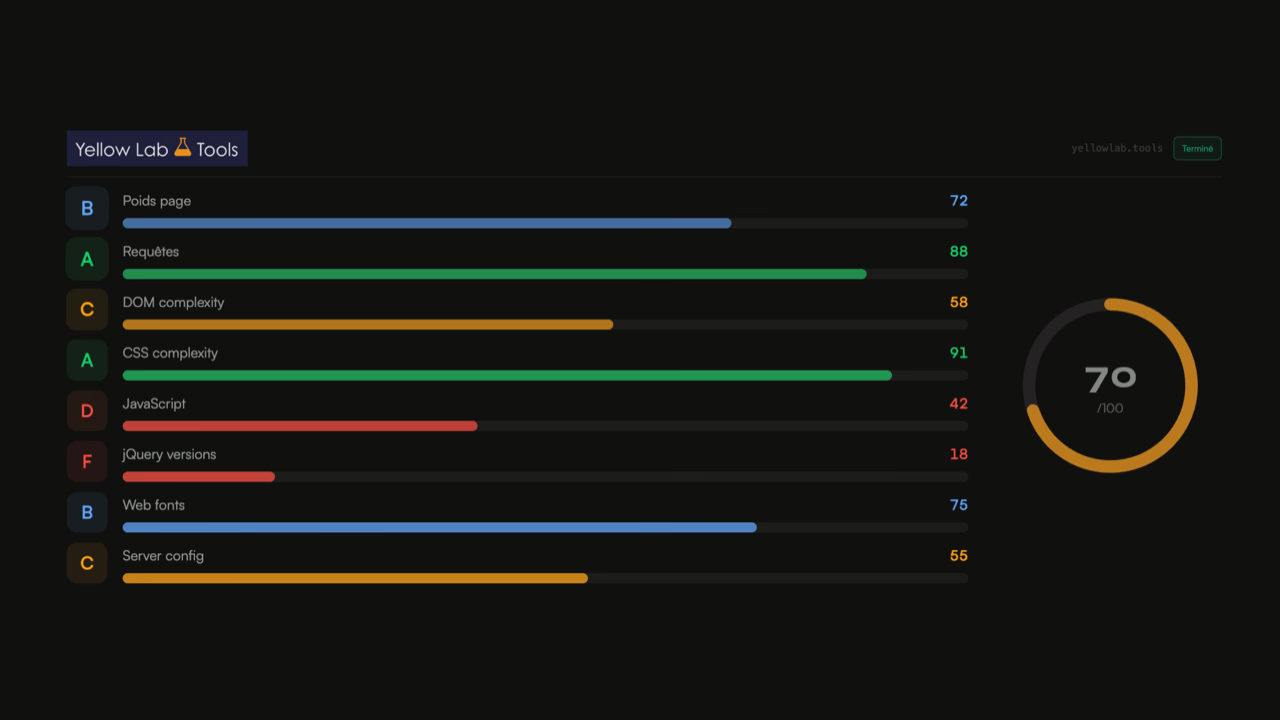
YellowLabTools (YLT) is an open source web performance and web quality tool. Developed by my colleague Gaël Metais and used with many clients. YLT allows me to get a precise and detailed overview of the overall quality of a website at the level of defined pages.
YellowLabTools is intelligently broken down by categories, and assigns a score out of 100 with a criticality system adapted point by point. After entering the URL to test and choosing the type of device to emulate — desktop, tablet, mobile or HD desktop (such as a retina screen) — the test will be launched on your page.
After more than 3 years of using the tool during web performance audits, it is for me an essential whenever I carry out a web performance audit for one of my clients.
💡 YellowLabTools also allows more advanced configuration, such as managing htaccess authentication, the ability to define cookies, or even blocking requests to one or more external domains. Page weight
The most important criterion for loading a web page faster is optimizing its weight. The tool proves very useful for detecting issues with your images (size and dimensions), but also with the compression used and the correct minification of your page's files.
By clicking on the page weight line, you can find the breakdown of the page weight by content type (HTML, JS, CSS, images, videos, webfonts, …)
Internal and external requests
YellowLabTools also audits all requests made by the tested web page. It will tell you the number of requests, but also the number of different domains called (as a reminder, each discovery of a new domain name can slow down the loading of a resource by 50 to 150ms).
In this same section, YLT will indicate if images could be lazy-loaded, specifying their URL, or if images are loaded without being displayed on screen.
In terms of quality audit, the tool will also indicate any request to a resource returning a 404 error (not found), or identical content between 2 resources.
DOM complexity
The number of DOM nodes or its depth are often sources of slow page rendering. In addition to identifying the most complex nodes for the browser, YellowLabTools indicates the number of iFrames present on the page, as well as any duplicate ID attributes between multiple elements, which could lead to a JavaScript error when using getElementById.
JavaScript code complexity
JavaScript is the source of freeze times on pages (often noticeable on article pages on ad-heavy sites with clickbait titles).
To ensure smooth navigation for your users, Yellow Lab Tools also measures the complexity of your JavaScript code based on its execution time, the number of DOM accesses, and the number of listeners on the scroll event (as a reminder, it is recommended to create only one scroll listener to avoid freezes when scrolling).
JavaScript execution issues
As with CSS, you may have JavaScript code execution issues. YellowLab records JS errors encountered during page loading, as well as other common bad practices in JavaScript.
jQuery usage
We will not debate the use of jQuery here, although it is questionable given that even Bootstrap removed the use of the library in June 2020.
WordPress still natively includes jQuery, and the majority of themes still rely on its features. On top of that, some plugins or themes will even load another version of the library. YellowLabTools can once again prove useful in this case by indicating whether multiple identical jQuery imports are being made on the tested page.
CSS code complexity
Essential for displaying the content of your pages and making them usable, CSS code that is too heavy or too complex can be a very significant obstacle to rendering your page.
The tool does not stop at CSS weight — it will also point out all the negative aspects of the code downloaded on the page regarding the complexity of the selectors used, as well as checking the colors used and whether some could be consolidated.
CSS issues
This is one of the biggest sections of the tool. Here it details the main issues in your website's CSS source code.
Yellow Lab Tools checks for the use of @import (a very bad practice in web performance), but will also inform you of any duplicate or redundant selectors. To further reduce the weight of your resources, YLT also surfaces IE selectors or those for other legacy browsers, which are unnecessary for the vast majority of users today.
For web quality, the number of uses of the !important rule and CSS syntax errors are also reported.
Web fonts
Fonts are an important topic in web performance: a poorly optimized typography file can delay the display of text on the site and unnecessarily increases the weight of your pages. Yellow Lab Tools offers an at-a-glance overview of the fonts used on your web pages.
Very useful on WordPress where some plugins import font files (generally poorly or not optimized at all), YLT will tell you the number of fonts used (1 weight = 1 file), but also the number of glyphs or whether the font format is optimized (WOFF2).
Server configuration
Even if it is difficult to do more by scanning the page with a headless browser, Yellow Lab Tools scans a few server-side elements. It is able to detect cache times that are too short or non-existent, as well as SSL certificate issues.
YellowLabTools: the ultimate web performance and quality tool?
For me, the tool is a must-use for any web performance audit — it allows you to very quickly identify quick wins in web performance on the site.
Once all the suggested performance optimizations are in place, the site will load much faster. A fast site does not need to have a score of 100/100 — these are simply indicators based on objective criteria without taking into account the technical constraints of your environment or your brand. A web performance expert or agency does not simply open a tool like YellowLab or Google PageSpeed — we instrument JavaScript code, explore resource preloading possibilities on the site, and work with your development teams to optimize server response times (back-end). Contact me if you need help getting a fast website!