Web Performance Optimization
Optimize the web performance of your site
E-commerce store, corporate site, or media: enhance your UX to increase your conversion rate with a web performance consultant integrated into your teams.
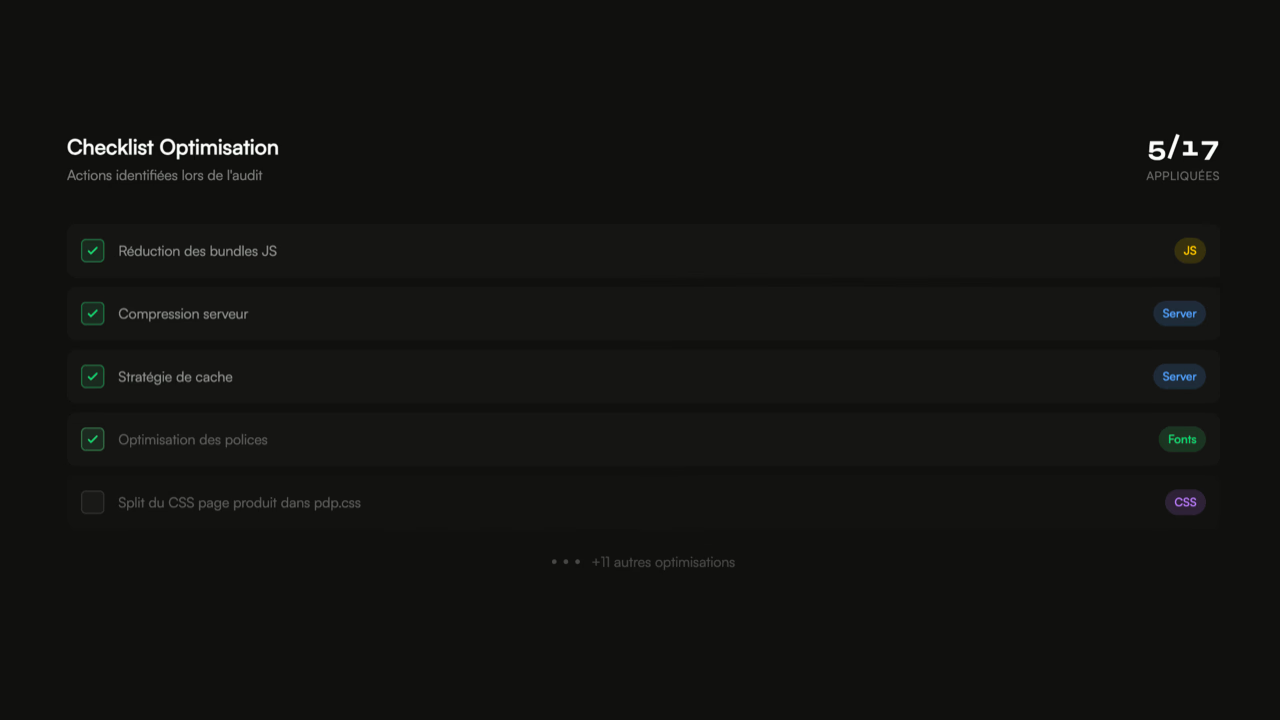
Optimization Checklist
Actions identified during the audit
applied
Trusted by leading brands
8 years, 35+ brands supported on high-stakes websites.











Quelques chiffres
Les clés de l'optimisation webperf
L'optimisation de la web performance a un impact direct sur le taux de conversion. Avec un site rapide, vous augmenterez les chances que vos visiteurs se convertissent en clients.
? Audit de web performance
L'audit est la première étape nécessaire à l'optimisation. En identifiant les éléments qui ralentissent la navigation, il est possible d'agir efficacement.
⚡ Optimisation de la performance
Je travaille directement à l'optimisation webperf de votre site, ou je m'intègre à vos équipes pour les aider à implémenter et vérifier les recommandations.
? Webperf et SEO
Google a introduit les Core Web Vitals en 2020 et donne un léger boost aux pages les plus performantes. Un site rapide est mieux positionné dans les résultats de recherche.
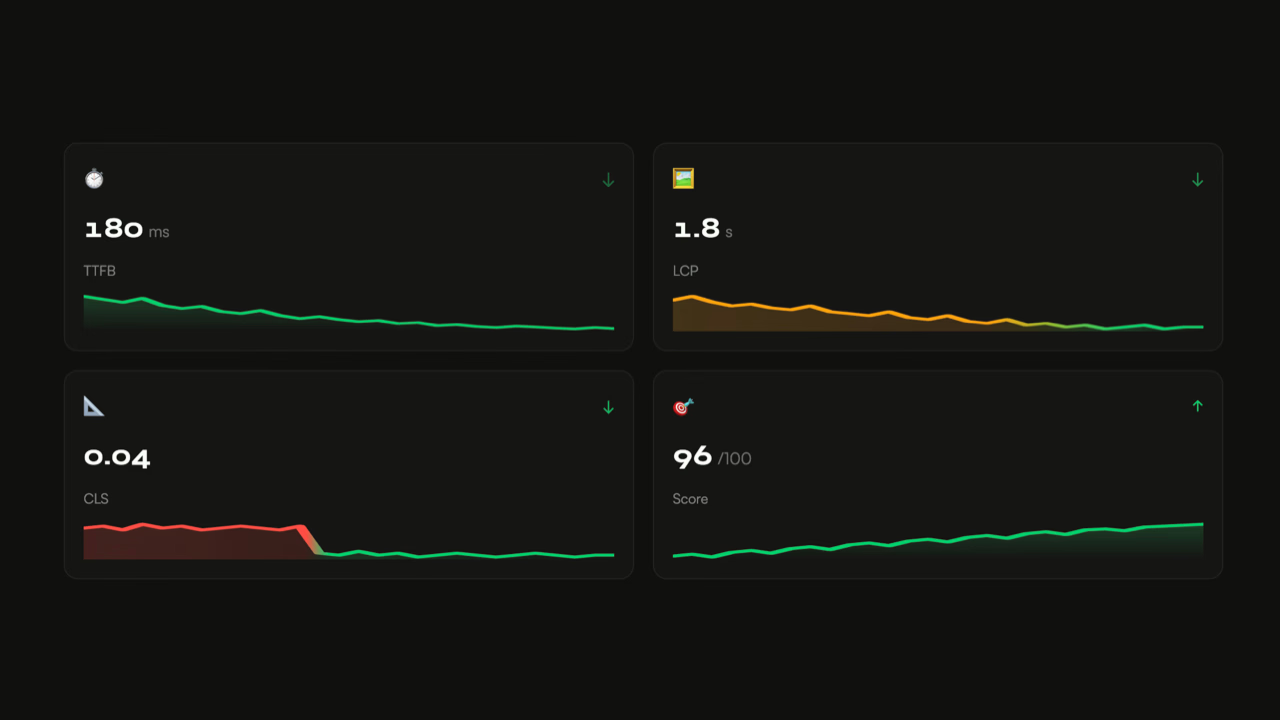
Des impacts mesurables instantanément
TTFB
LCP
CLS
Score
Comment se passe une optimisation ?
Un accompagnement structuré pour des résultats mesurables
Plan d'action
Élaboration d'une feuille de route priorisée par impact et difficulté d'implémentation.
Implémentation
Optimisation directe ou accompagnement de vos équipes pour intégrer les recommandations.
Vérification
Tests de performance avant/après pour valider chaque optimisation mise en place.
Plan d'action
Élaboration d'une feuille de route priorisée par impact et difficulté d'implémentation.
Implémentation
Optimisation directe ou accompagnement de vos équipes pour intégrer les recommandations.
Vérification
Tests de performance avant/après pour valider chaque optimisation mise en place.
Résultats constatés chez mes clients
Je travaille sur tous CMS et technologies
Peu importe votre stack technique, j'ai l'expertise pour optimiser votre site.






















Résultats mesurables garantis
Si les optimisations réalisées n'améliorent pas vos Core Web Vitals sous 30 jours, je retravaille gratuitement jusqu'à atteindre les objectifs fixés.
Ce qu'en disent mes clients
Excellent work.
Paul has significantly improved the site's speed and perfectly aligned it with Google's recommendations.
Professional, thorough, and efficient, I highly recommend.
Nicolas - April Moto
Digital & E-commerce Director
We are very satisfied with Paul's work. He is quick, available, and particularly effective. Since his arrival, very good results have been observed, both in terms of performance and responsiveness. A real asset for our team.
Léo - Luxury brand
E-commerce Product Owner
I don't know if we've said it enough.
But if you want to improve your loading speed,
Make Google happy and get your Core Web Vitals in the green,
Contact Paul Delcloy.
Florian Darroman - Les Makers
Co-founder
Besoin d'autre chose ?
Complete audit of your site's web performance: identification of bottlenecks, analysis of Core Web Vitals, and prioritized recommendations.
Continuous monitoring of web performance: tracking Core Web Vitals, real-time alerts, and regression detection.
Support for reducing the carbon footprint of your website: eco-design, page weight optimization, and responsible hosting.
Questions fréquentes
Pourquoi optimiser la web performance ?
Sur quelles technologies travaillez-vous ?
Quelle est la différence entre audit et optimisation ?
Combien de temps dure une optimisation ?
Prêt à accélérer votre site ?
Data 2023-2026
Web performance and user experience
Web performance is a foundational pillar of user experience. A slow site generates frustration, increases bounce rate and damages the perception of your brand. Studies show that 40% of users leave a site that takes more than 3 seconds to load, and that 47% of consumers expect a load time under 2 seconds.
Optimizing perceived performance — the time felt by the user — matters just as much as actual performance. Techniques like lazy loading, prefetching and Critical Rendering Path optimization make a page feel fast even when it carries heavy content.
Web performance and conversion rate
The correlation between performance and conversion has been documented for years. According to Kissmetrics, 79% of shoppers dissatisfied with a site's performance never come back. Amazon has shown that one additional second of latency could cost 1.6 billion dollars in annual revenue.
For an e-commerce site, every millisecond matters: optimizing load time on product pages, the checkout funnel and category listings has a direct, measurable impact on average basket and conversion rate.
Resilience and carbon footprint
A high-performance site is also a more resilient and more efficient site. By reducing page weight and the number of server requests, you cut the energy consumption of both your infrastructure and your users. An optimized site handles traffic spikes better and delivers a stable experience even on degraded connections.
How to improve web performance
Web performance optimization operates on two complementary fronts. On the front side: image optimization, CSS and JavaScript minification, lazy loading, browser cache configuration and reduction of the Critical Rendering Path. On the back side: database query optimization, server-side caching, CDN configuration and HTTP response compression.
My approach is to integrate directly with your technical, marketing and design teams so that every optimization is implemented properly and sustainably, without compromising existing features.
Monitoring web performance
Optimization is not a one-off event but an ongoing process. Every new feature, content update or third-party script can degrade performance. Regular monitoring of Core Web Vitals (LCP, INP, CLS) makes it possible to catch regressions before they hit your users and your revenue.
What a web performance optimization engagement really covers
Web performance optimization is often reduced to a list of technical recommendations: compress images, minify CSS, enable caching. That advice has circulated on blogs for ten years, and it is valid. It is also insufficient. A senior consultant is not brought in to apply a checklist, but to make the technical decisions the checklist does not cover.
After eight years working with sites where commercial stakes are high, the real differentiator is never the list of known optimizations. It is the ability to arbitrate between conflicting alternatives: preserve a brand font or gain 200 ms of LCP, keep a legacy analytics tag or switch to server-side, refactor a component or live with residual CLS. These trade-offs cannot be automated because they touch product, design and marketing as much as they touch engineering.
A serious web performance optimization engagement therefore starts with this question: which trade-offs are you willing to accept, to gain on which metrics? Without that initial conversation, the consultant applies a generic method and delivers results well below the real potential.
Front, back, infra: where optimization produces the most gain
Perceived performance depends on three layers that stack up: how long the server takes to respond (TTFB), how long the browser takes to display meaningful content (LCP, CLS) and how long the page takes to become interactive (INP). Each layer has its own levers, and priorities shift with the nature of the site.
On a low-volume showcase site, the back end is rarely the problem. TTFB stays under 400 ms on any decent shared hosting. The active levers are on the front: a properly sized LCP image, disciplined web fonts, deferred third-party scripts. 80% of the gains play out in 5% of the HTML and CSS.
On a high-volume site or an SPA, the picture flips. TTFB explodes under load, JavaScript hydration becomes the real drag on INP, and CDN cache strategy weighs more than any image optimization. The active levers are on infra and back end. The front end is no longer the primary lever, but it becomes a multiplier (a well-designed front architecture exploits an optimized back end more efficiently).
On a React, Angular or Vue application with heavy interactivity, the real fight is on INP. The main thread is saturated by JavaScript, every interaction triggers cascading renders, listeners pile up. Optimization comes through aggressive code-splitting, memoization, and offloading heavy work to Web Workers.
This front / back / infra breakdown is the framework I use from the very first scoping call. It prevents a consultant who only masters one layer from promising gains that require intervention on the other two.
Islands architecture and partial hydration: the pattern that changes the game

Chanel, when Lighthouse says red and CWV say green.
Luxury showcase site on [Next.js](https://pauld.fr/en/expertises/wordpress), a product journey with high editorial density, Lighthouse score sitting around 51 in the synthetic test. A score that could have triggered an anxious redesign. CrUX data told a different story: Core Web Vitals cleared with room to spare, excellent field INP, LCP under control. The reason lies in an architectural decision made from the start of the project: islands architecture with isolated interactive components, partial hydration that activates JavaScript only where it is needed, and no parasitic re-hydration on user interactions. The result: Lighthouse measures the load of a heavy pre-rendered page and penalizes the score, but users benefit from a responsiveness the synthetic tool cannot simulate.
This case illustrates a counter-intuitive truth: optimizing for Core Web Vitals is not the same as optimizing for Lighthouse. On projects that can accommodate it, islands architecture completely changes the equation. It makes rich editorial content possible without paying the INP tax, because JavaScript is only present on the components that need it. It is the most powerful structural lever I have seen emerge on modern front-end projects over the last five years.
On more classic stacks (WordPress, Drupal, PrestaShop), the same principle applies: reduce the JavaScript surface executed on first render, defer everything that is not critical, and only load interactive widgets on the first user interaction.
The decisions that move the needle (and the ones that waste time)
Some fixes burn days of development for a field gain under 50 ms. Others land in half a day and return 400 ms. The consultant's job is to know the difference.
High-ROI fixes, in my experience, revolve around five patterns. Prioritizing the LCP image via fetchpriority="high" combined with a conditional preload: two minutes of work, often 200 to 500 ms of LCP gained. Disabling or deferring non-critical third-party scripts (chat, reviews, remarketing on catalog pages): a few hours of negotiation with growth teams, often 300 ms of INP returned. Setting up font-display with size-adjust and ascent-override descriptors on the fallback font: half a day of calibration, CLS brought down to near zero on custom fonts. Moving personalization computation (customer pricing, wishlist, real-time stock) out of the initial HTML render: two to three days, CDN cache restored, massive gains on field TTFB. Plain and simple removal of decorative components with heavy JavaScript consumption (hero carousels, particles background, excessive scroll animations): more a negotiation than a fix, results visible immediately.
Conversely, the low-ROI fixes I regularly see proposed: minifying files already minified by the bundler, optimizing images that already weigh under 40 KB, enabling HTTP/2 on a host that has had it by default for five years, preloading ten resources when nine of them are not on the critical path. These fixes inflate audit reports but move no field indicator.
What I concretely deliver at the end of an engagement
A web performance optimization engagement is judged by its deliverables. The initial audit report is not a deliverable — it is a prerequisite. What matters is what remains after the sprint.
On every project, I deliver three items. A pull request (or an applicable patch, depending on the client's workflow) that contains the implemented fixes, commented line by line, testable in preview before merge. A before / after comparison table on field metrics (CrUX when available, RUM when the tooling is in place, multi-location WebPageTest measurements otherwise) with documented and reproducible measurements. A governance document that sets the rules to hold on upcoming deployments: performance budget per page type, validation checklist before integrating any third-party script, alert thresholds on Core Web Vitals.
This last deliverable is the one clients underestimate the most at kickoff and cite the most at project close. Without written rules of engagement, regressions arrive within three months. With them, performance becomes a first-class product criterion, discussed in sprint review and measured continuously.
What optimization cannot do on its own
Three limits to know, honestly, before commissioning the engagement.
Optimization does not fix a poorly calibrated underlying architecture. On a site built on a poorly chosen CMS, with a badly indexed database, on infrastructure undersized for its traffic, application-layer optimization quickly hits a ceiling. TTFB stays at 800 ms because the MySQL server is saturated, not because the application code is slow. In these cases, an audit may recommend an infra migration or a partial redesign before any optimization work.
A one-off optimization does not replace a continuous web performance monitoring system. Core Web Vitals degrade silently with every deployment, every marketing integration, every plugin update. Without surveillance, the gains of an optimization sprint disappear within three months. Monitoring turns a one-off investment into a durable asset.
Optimization does not replace a product or design decision. If the catalog imposes a hero video, if the checkout imposes an OTP with a waiting screen, if the brand guidelines impose a heavy custom font, no consultant can make the associated technical cost disappear. They can reduce it, move it, change its nature. They cannot suppress it. The best optimizations are the ones that push upstream, into the design phases, before the technical cost is written into the code.
Frequently asked questions about web performance optimization
What is the difference between an audit and a web performance optimization?
The audit identifies and prioritizes; the optimization implements. The audit closes with a report and a matrix of recommendations. The optimization closes with fixes in production, measurable on field data. The two engagements are complementary. Skipping the audit before an optimization means fixing without knowing what pays off.
How long does a typical engagement take?
A scoped optimization sprint lasts 2 to 4 weeks for a mid-size site. A continuous monthly retainer (2 to 4 days per month) fits platforms that deploy often and want to sustain their performance over time. The format is chosen based on the client's product cadence, not a general rule.
Do you need to know the client's CMS to optimize it?
Yes. Generic optimization produces generic gains. The real levers often depend on the platform: PHP cache on PrestaShop, server-side tag manager on Shopify Plus, ISR revalidation on Next.js, Batch API on Drupal. A consultant who never opens the code does not reach these levers.
Can a site be optimized without the internal developers being involved?
Technically yes, operationally no. Fixes have to go through code review, be tested in preview, be deployed through the usual pipeline. Without the developers, the patch stays in a drawer. The format that works is that of an augmented team: the consultant works alongside the internal developers, transfers the method and lets a performance culture take root.
Can optimization degrade other aspects of the site?
Rarely, when properly executed. The classic risks are known: deferring a critical script by mistake, breaking a feature by removing a library that looked useless, degrading SEO by altering the HTML structure. Every fix has to be tested on a preview environment before merge, with a documented rollback plan. That is the price to pay for touching production.
How long before results show up in Search Console?
CrUX data updates on a 28-day rolling window. After a fix is deployed, expect 4 to 6 weeks before the improvement is reflected in the Search Console Core Web Vitals report. On internal field data (CrUX or proprietary RUM), the effect is visible from the first week.
Does a guaranteed optimization really improve Core Web Vitals?
On my engagements, if recommendations applied in line with the plan do not improve Core Web Vitals within 30 days, I rework the engagement at no extra charge. The commitment exists because I deliver quantified gain hypotheses per fix, testable in preview before merge. The guarantee is not about generic promises but about reproducible measurements.