- Web Performance
- Images
Using AVIF or WebP to optimize web performance
Modern image formats WebP and AVIF significantly reduce the weight of your pages. Complete guide.

Paul Delcloy
Author
All web performance experts point to images as the main reason for a poor user experience on a website. In reality, this is primarily the simplest issue to fix in web performance since images account for an average of 50% of the total weight of a web page.
In addition to sizing images to their displayed size for users and adding responsive images to deliver optimized media on mobile, it is crucial to use modern image formats like WebP or AVIF.
The WebP Format: An Important Change
Google launched the WebP format for the web in 2010 to speed up website loading times. The WebP format allows for displaying quality images with file sizes smaller than the most well-known formats: JPG or PNG.
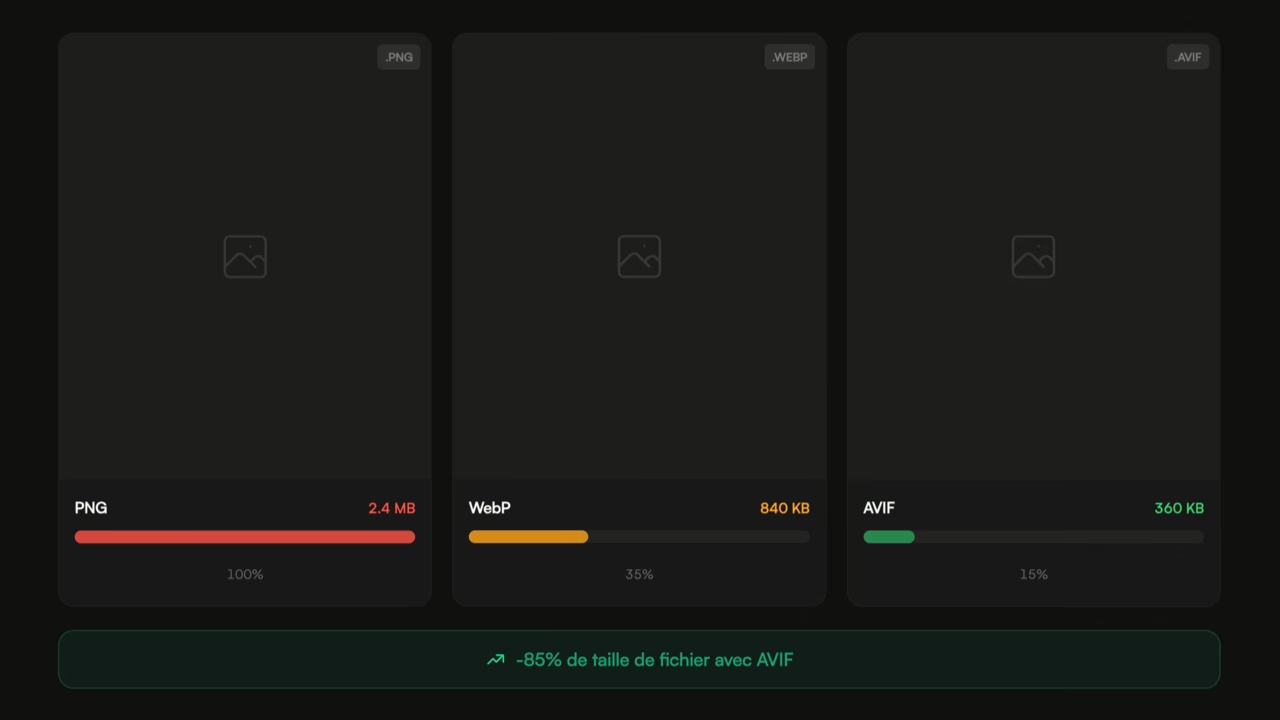
Lossless WebP images are up to 34% lighter than PNGs.
The AVIF Format: The Revolution of Online Images
AVIF is a new image format based on the AV1 video codec. The AVIF format offers even greater compression than WebP (just imagine compared to PNG or JPG).
Although it is difficult to precisely estimate the weight savings since it depends on the media content, export settings, and desired quality, the observed gain is around 26% compared to PNG, and 25 to 34% lighter than JPG.
Support for the format has significantly expanded in 2023 with Safari's support. According to Can I Use ↗, about 96% of global users will support the AVIF format by the end of 2024. This means that all users likely to browse your website will see an image in AVIF format if it is offered.
The Importance of Image Format Diversity
There is no need to choose which formats to offer your users; using the tag allows you to provide all the formats you want to your users.
By offering AVIF, WebP, and JPG (or PNG if transparency is necessary for the specific visual), you ensure that the user can see your image and that the lightest format compatible with their browser is used.
In March 2024, Google hinted that GoogleBot (used to crawl the pages of your website) does not support the AVIF format, this announcement reaffirms the importance of continuing to deliver as many formats as possible.
Image optimization will significantly improve the web performance of your site. If you offer them, also consider the possibility of optimizing your videos by providing WebM and AV1 formats in addition to MP4.
How to Offer WebP Images on WordPress?
On WordPress, it is possible to use plugins like Imagify that allow you to optimize your images in bulk, but also to convert them to WebP.
To offer the format without modifying the source code of your site, Imagify will dynamically modify the DOM of the page, a caching plugin like WP Rocket will be essential to avoid slowing down your site's server response time.
As a web performance consultant, I can take care of installing and configuring these WordPress plugins dedicated to improving WordPress web performance.
How to Convert Images to WebP or AVIF Online?
Many online tools allow you to convert a PNG or JPG image to AVIF or WebP formats. Personally, I use the free site Online Convert Free ↗, but there are many free alternatives available.
For larger players, it is also possible to work with companies specialized in image delivery (like Akamai or Cloudinary) that handle on-the-fly optimization of your media placed in buckets using parameters (weight, size, format, crop, ...) in the URLs of your site's media.
How to Export Images as WebP with Photoshop?
If you produce visuals or images from Adobe Photoshop, it is possible to export images directly in WebP format from the software.
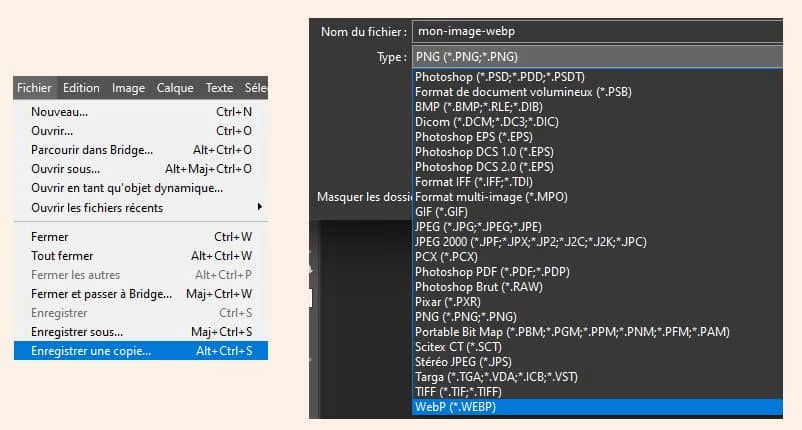 To do this, use the File menu, save a copy (or use the shortcut Alt + Ctrl + S), select the desired location, and the WebP format from the dropdown menu. Test different qualities to determine which one satisfies you, as everyone's requirements may differ.
Published on 27 Sep 2023
Updated on 31 Mar 2026