- Web Performance
- Front-end
Preload: which resources to preload for web performance?
Preloading resources speeds up the loading of your pages. Discover how to use preload effectively.

Paul Delcloy
Author
When a web page is loaded, the browser downloads an HTML file from a server, processes its content, and submits various requests for the resources listed in the code. As a user, you know which resources are important. On its side, the browser needs help identifying priority resources to display the page as quickly and efficiently as possible to the user. To do this, you can guide it using .
How does preloading work?
Preloading is a modern mechanism useful for resources that are usually discovered late by the browser.
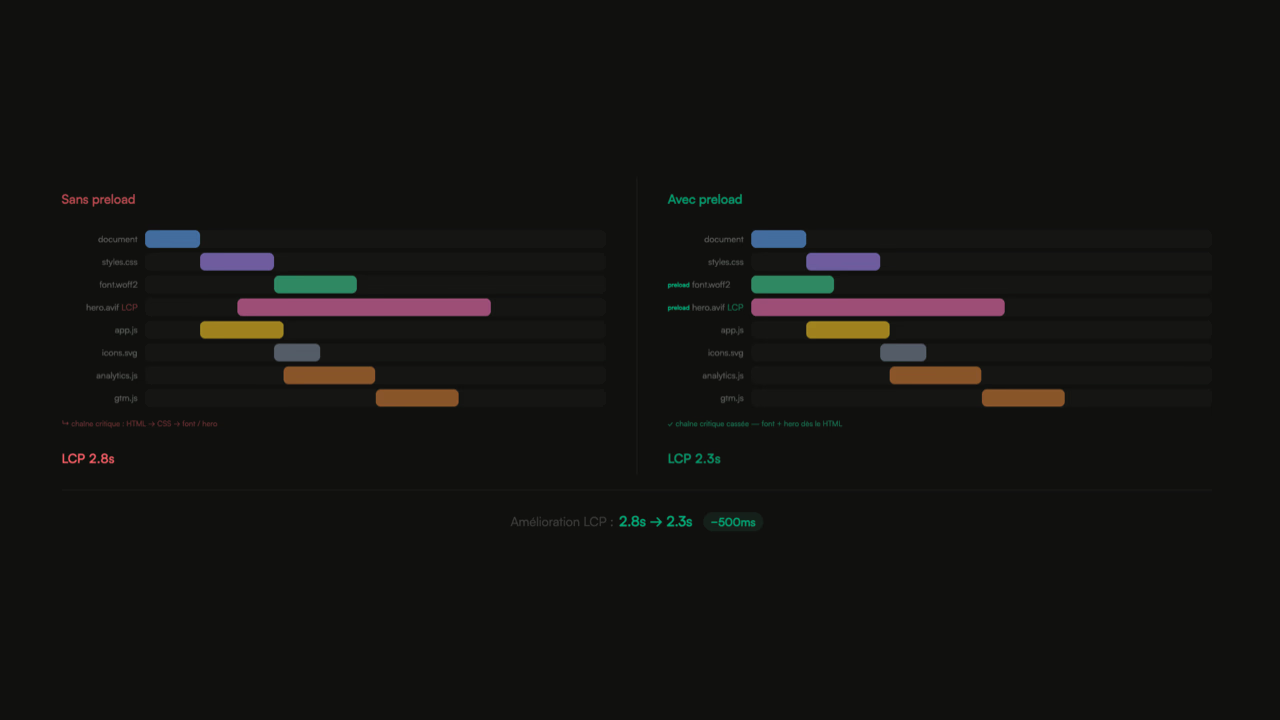
 In this example, font files are discovered only after the CSS file where they are called with the @font-face method has been loaded. The browser starts downloading them once the CSS file has been downloaded and parsed. By intelligently preloading certain resources, you indicate to the browser that you want it to load these files well before it would typically discover them because you are certain they will be needed for loading the current page.
 In this example, the font files have been preloaded and are now being downloaded at the same time as the CSS. This kind of dependency between multiple files is called a chain of critical requests: since one file calls another, and the browser has no way of determining which files to load in advance without having parsed the previous one.
To address this kind of issue, it is often useful to preload a resource using a preload tag:
<link rel="preload" href="style.css" as="style" />
<link rel="preload" href="main.js" as="script" />
This tag should be adapted based on the type of resources (via the as attribute) and with the URL of the resource (via the href attribute). Be careful, the value of href is sensitive: if a slash or a query string differs, the file will be loaded twice.
⚠️ If the as attribute is not specified, the request will be treated as an XHR call and will therefore be made twice, negating the effect of preloading.
When discovering this preload directive, the browser will download the file into the user's cache so that it is available when needed. JavaScript files will not be executed, and the CSS will not be applied until the file is called in the page.
💡 If a file is set to preload but is not called within 3 seconds of the load event, Chrome will raise a warning in the development console.
Preloading a font: the specific case
Are you trying to preload a font as mentioned earlier? This case is a bit special. For complex technical reasons (see), fonts are loaded with crossorigin.
Thus, to correctly preload a woff2 file (or other font format), you need to add the crossorigin attribute to your HTML tag as follows:
<link rel="preload" href="fonts/cicle_fina-webfont.woff2" as="font" type="font/woff2" crossorigin />
The effect of preloading on core web vitals
Using preload is a powerful asset in web performance optimization; preloading significantly speeds up the website. Such optimizations can lead to noticeable changes in Core Web Vitals. That’s why it’s very interesting to test and learn how preload works.
Largest Contentful Paint (LCP)
Preloading has a significant impact on the Largest Contentful Paint for fonts and images, given that fonts like images can be candidates for LCP. Hero section images or important text blocks that depend on additional font files can benefit significantly from thoughtful preloading. The opportunity to gain hundreds of milliseconds on page load time with a simple line of code is undeniable!
On the contrary, care must be taken to avoid the excessive use of preload tags. If you preload too many resources, it is the same as preloading none. Preloading too many resources risks leading to bandwidth contention issues between resources.
To truly improve the web performance of a page, I recommend only preloading modern resource formats (WOFF2 for fonts, WebP or AVIF for images).
Cumulative Layout Shift (CLS)
Cumulative Layout Shift (CLS) is an important core web vital that can be negatively impacted by fonts, especially when using the CSS property font-display to customize the font loading mode.
It is important to experiment with the different possible values for loading your web fonts. If you preload your font file, I would recommend using the block value to eliminate any Layout Shift.
If you are more technical, it is possible to use fallback fonts, calculated from ratios to allow displaying text with a system font installed on all your users' computers while waiting for your custom fonts to load.
Preloader: a mandatory solution in web performance by 2026
To improve site speed, it is essential to preload the important resources of your pages that are discovered late by the server. Preloading all resources of a page would be counterproductive, so use preloading sparingly and measure the impact on the ground.
Published on 23 Sep 2023
Updated on 31 Mar 2026