- Web Performance
- WordPress
- Étude de cas
Case Study: How April Moto Optimized Its WordPress Site
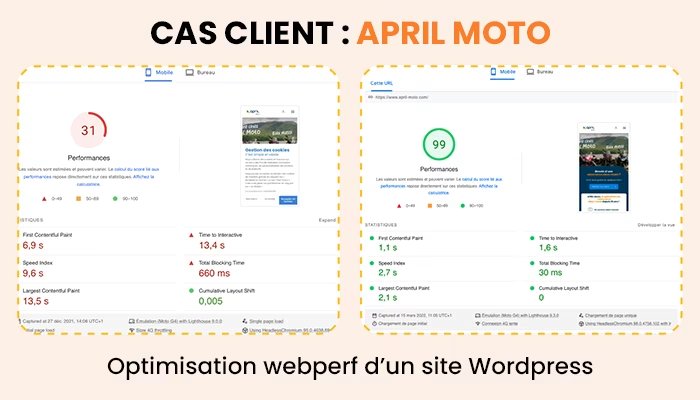
Discover how April Moto went from a PageSpeed score of 40 to 99 thanks to a complete web performance optimization of its WordPress site.
Paul D.
Author
In 2021, April Moto contacted me to optimize the web performance of their company's WordPress site. According to basic synthetic testing tools, their site's score was poor. The core web vitals were not validated and presented issues with FCP, LCP, and Total Blocking Time.
My web performance optimization stack for WordPress mainly consists of 3 plugins:
- Imagify, my favorite tool for image compression and bulk conversion to WebP format;
- WP Rocket, which allows for a large number of web performance optimizations such as minification of CSS and JS files or lazy-loading of images;
- Perfmatters, a lightweight plugin that allows for better control of resources loaded on the site, taxonomies, or even on individual pages.
Image Optimization
The simplest part of web performance optimization is optimizing WordPress images. With a plugin like Imagify, it is possible to bulk optimize all images already uploaded to the site, as well as those that will be uploaded later. The optimization is done in real-time, completely transparently for the user.
Imagify also allows for the transformation of images to WebP format, saving up to 30% of their weight without any perceptible loss of quality to the human eye. To provide the best support to users, Imagify will rewrite the site's URLs to serve the WebP format of an image if it exists, and keep the original format in the case of an incompatible browser.
WP Rocket Configuration
The WP Rocket extension offers a large number of options; I will detail in a dedicated article the configuration I regularly use for my web performance optimizations on WordPress although it is important to keep in mind that each site and theme are different, the configuration must be adapted and fine-tuning should be considered for each technical environment in production.
Lazy-loading Images
WP Rocket offers a very user-friendly feature for media. In two clicks, lazy-loading is applied to all images on the site and to the YouTube iframes present on April Moto's pages. This option significantly reduces the number of images loaded but has simple flaws that can be corrected with more advanced optimization.
By default, all images were lazy-loaded on the site, which is not ideal for improving LCP since the browser does not know which image to start downloading until the page rendering has begun. To address this issue, the image exclusion field allowed me to define rules for identifying images above the fold:
- First, I identified the filename of the logo, which was added to the lazy-loading exclusions;
- The featured image of the articles had a unique class, which I was able to use via an appropriate selector to exclude all main images of the site's articles.
💡 During this optimization, I noticed that the logo present in the footer was identified as being able to be lazy-loaded by Google Pagespeed: this is a false signal. Since it is loaded in the header, when it is loaded in the footer, the logo is already in the user's cache and will only be downloaded once.
Since the April Moto theme was custom-developed, I was able to define a CSS class .no-lazy and applied it to all above-the-fold media to ensure the longevity of this optimization.
Optimized CSS and JS Assets
WP Rocket also allows for the optimization of CSS and JS resources. In a few clicks, the site's CSS and JS resources were minified, and a defer attribute was present on all scripts on the site, thus unblocking the page rendering for the user.
To go a bit further, the option to defer the execution of JavaScript helped free up the user's processor and reduce the Total Blocking Time for April Moto. The files are only executed once an interaction is performed by the user on the page (mouse movement, click, keyboard input).
Using WordPress Filters
All these tips come from simple configurations, although they require diligence and time to be adapted; you will likely break your site several times while trying to apply them yourself, but all the advice is accessible to a user even without technical knowledge.
With these next tips, I was able to improve the web performance of the April Moto WordPress site to its limits.
Preloading the Featured Image
By using the page thumbnail and the filter get_the_post_thumbnail_image, it is possible to preload the main image of the page by adding the following code to your theme's functions.php file (or in a dedicated WordPress extension).
add_action('wp_head’, 'pauld_preload_main_image', 11);
function pauld_preload_main_image()
{
  if (get_the_post_thumbnail_url()) {
    echo ''."\n";
  }
}
Optimizing CSS Code
2 native filters are very useful for optimizing performance on WordPress; the first allows loading only the CSS of the used Gutenberg blocks:
add_filter('should_load_separate_core_block_assets', '__return_true');
By modifying the value of styles_inline_size_limit, it is also possible to force the CSS to be sent externally instead of inline code in the page, which would not be cached or optimized by WP Rocket.
add_filter('styles_inline_size_limit', '__return_zero');
Optimizing User Resources
Network bandwidth and the user's device power can throttle a site's performance if overused. To avoid saturating user resources, it is recommended to deliver only the strictly necessary resources for using a web page.
With Perfmatters, I was able to exclude certain resources from pages where they were not used. For example, the CSS and JS of the contact form were loaded on all pages of the site. I also ensured that the resources of a plugin that formats tables on the site's pages were only loaded on the taxonomy pages where they were used.
The Perfmatters extension allows for very fine granularity in its configuration; it is possible to remove a resource from the entire site, but also to do it page by page.
Optimizing Fonts
April Moto was calling fonts from an external domain. This is a bad practice both in terms of web performance and GDPR compliance.
Local importing of fonts and properly executed preload improved the text display time by nearly 700ms according to Google Pagespeed, which is a significant improvement in FCP!
Server Configuration Optimization
Communication with the server is a very important point in web performance; April Moto works with a managed service provider. Any service for optimizing WordPress web performance includes communication with the client's partners and suppliers for whom I work.
Support for HTTP/2 Protocol
HTTP/2 was released in 2014, and the proportion of compatible users is nearly 95% today. The main benefit of this network protocol is that it allows multiple files to be downloaded in parallel, unlike HTTP/1 which only downloads one file at a time.
The implementation of HTTP/2 helped boost April Moto's Pagespeed score from 92 to 99/100.
Deployment of Brotli Compression Algorithm
Brotli is a compression algorithm that accelerates the loading time of the site's resources and text files. Very efficient, Brotli can reduce file sizes by 14 to 21% according to Facebook and Dropbox.
By implementing these 2 simple optimizations on the server, the Pagespeed score jumped by nearly 13 points!
Results of the WordPress Web Performance Optimization Service
With all these optimizations in place on the site, the WordPress web performance optimization for April Moto allowed for a jump in the Pagespeed score from 40 to 99, but more importantly, a validation of Google's CrUX field data 28 days later across all pages of the site.
Weeks after the optimization, the client came back to me for advice regarding the addition of a video at the top of their homepage, which had impacted their page score. After a quick analysis, I noticed that the video format could be optimized but especially that there had been no implementation of a thumbnail on the player via the thumbnail attribute.
These 2 modifications helped improve the Pagespeed score of the WordPress site and ensure the longevity of the performance score over time.
Do you lack the necessary knowledge to apply these tips, or do you want to delegate this optimization work to a web performance expert? Contact me, I will be happy to assist you with all your WordPress web performance issues!